

There are 2 ways to change the page layout in Magento 2.
In this article, we show you how to change the Magento 2 page layout by creating a custom theme. Please mention that you can also update the layout via Category Page Builder and Product Page Builder.
Before you start adding a new page layout in Magento 2, make sure you already created a custom theme based on one of Argento themes.
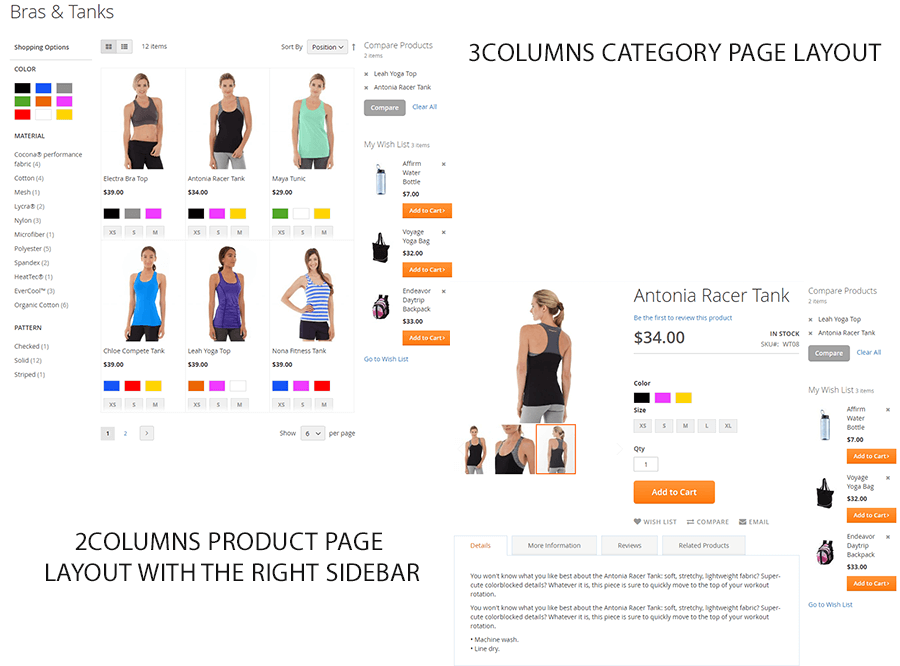
Now we are going to update the product page layout to 2columns with the right sidebar. We’ll also update the category layout in Magento 2 to 3columns.
Please follow the steps:
app/design/frontend/Local/argento-[essence|flat]-custom/Magento_Catalog/layout
<?xml version="1.0"?>
<page layout="3columns" xmlns:xsi="http://www.w3.org/2001/XMLSchema-instance"
    xsi:noNamespaceSchemaLocation="urn:magento:framework:View/Layout/etc/page_configuration.xsd">
</page>
<?xml version="1.0"?>
<page layout="2columns-right" xmlns:xsi="http://www.w3.org/2001/XMLSchema-instance"
    xsi:noNamespaceSchemaLocation="urn:magento:framework:View/Layout/etc/page_configuration.xsd">
</page>
Please check the result:
This website uses cookies to improve your experience. By clicking “Deny”, you consent to the use of Necessary cookies only. You may also accept selected cookies only.