

Some users may want to show product tabs under the product image. With the Luxury design, we make it possible.
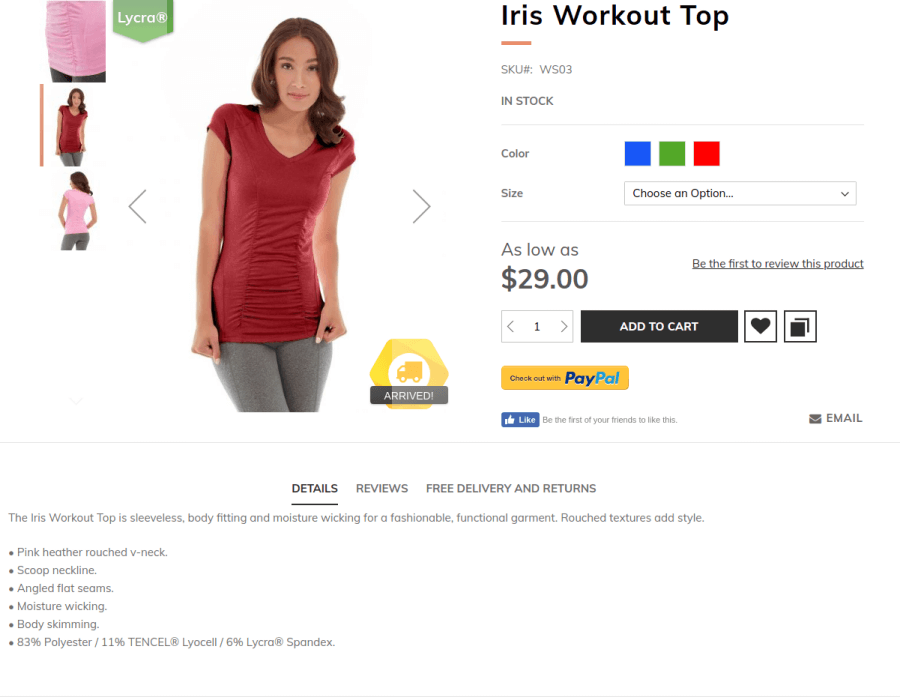
First, you have to create a custom theme and apply it to your store. Then you should create the file Magento_Catalog/layout/catalog_product_view.xml in the custom theme directory.
A further step is to insert to the file a code mentioned below:
<?xml version="1.0"?>
<page xmlns:xsi="http://www.w3.org/2001/XMLSchema-instance"
        xsi:noNamespaceSchemaLocation="urn:magento:framework:View/Layout/etc/page_configuration.xsd">
    <body>
        <!-- Create container for main product tabs -->
        <referenceContainer name="page.wrapper">
            <container name="custom-before-footer-container" before="before-footer-container" label="Luxury Custom - container for main tabs" htmlTag="div" htmlClass="page-before-footer">
                <container name="custom-before-footer-content" label="Luxury Custom - main tabs content" htmlTag="div" htmlClass="content">
                </container>
            </container>
        </referenceContainer>
        <!-- Hide additional tabs -->
        <referenceBlock name="additional-tabs" display="false" />
        <!-- Move product tabs into new place -->
        <move element="product.info.tabs" destination="custom-before-footer-content" before="-"/>
    </body>
</page>
Save file. Clean Magento Cache. Check product page at storefront.
This website uses cookies to improve your experience. By clicking “Deny”, you consent to the use of Necessary cookies only. You may also accept selected cookies only.