

Jumbotrons — are the wide colorful blocks on the homepage of Flat, Force, Home and Luxury themes.
<div class="jumbotron jumbotron-image no-padding">
    <!-- "Cover" will be rendered at the bottom of current element and will partially cover its content -->
    <div class="cover"><div class="left triangle"></div><div class="right triangle"></div></div>
    <div class="container">
        <!-- Content goes here -->
    </div>
</div>
<div class="jumbotron hero">
    <div class="container">
        <!-- Content goes here -->
    </div>
</div>
<div class="jumbotron hero">
    <!-- "Stub" will be rendered at the top of current element -->
    <div class="stub"></div>
    <div class="container">
        <!-- Content goes here -->
    </div>
</div>
| Type | Class name | Description |
|---|---|---|
| Background | jumbotron-image | Use image as a jumbotron background |
| Background | jumbotron-pastel | Use pastel background color |
| Background | jumbotron-pastel-alt | Use alternative pastel background color |
| Background | jumbotron-pattern | Use pattern background |
| Background | jumbotron-bright | Use bright background |
| Background | jumbotron-dark | Use dark background |
| Text | hero | Use large titles inside jumbotron |
| Text | jumbotron-inverse | Use white text and title colors |
| Layout | no-padding | Do not use default paddings |
| Layout | no-padding-top | Do not use default top padding |
| Layout | no-padding-bottom | Do not use default bottom padding |
See the paragraph below on how to use these variables.
| Variable | Variable name | Default value |
|---|---|---|
| Spacing | @jumbotron__padding | 25px 0 20px |
| Background | @jumbotron__background | #fff |
| Background | @jumbotron-bright__background | #f15922 |
| Background | @jumbotron-pastel__background | #229392 |
| Background | @jumbotron-pastel-alt__background | #a5205f |
| Background | @jumbotron-pattern__background | url(../images/pattern.jpg) 50% 0 |
| Background | @jumbotron-image__background | url(../images/bkg_sky.jpg) 50% 0 |
| Background | @jumbotron-dark__background | #222337 |
| Text | @jumbotron-dark__text-color | lighten(@jumbotron-dark__background, 60%) |
| Text | @jumbotron-inverse__text-color | #fff |
| Misc | @jumbotron-cover-triangle__z-index | 2 |
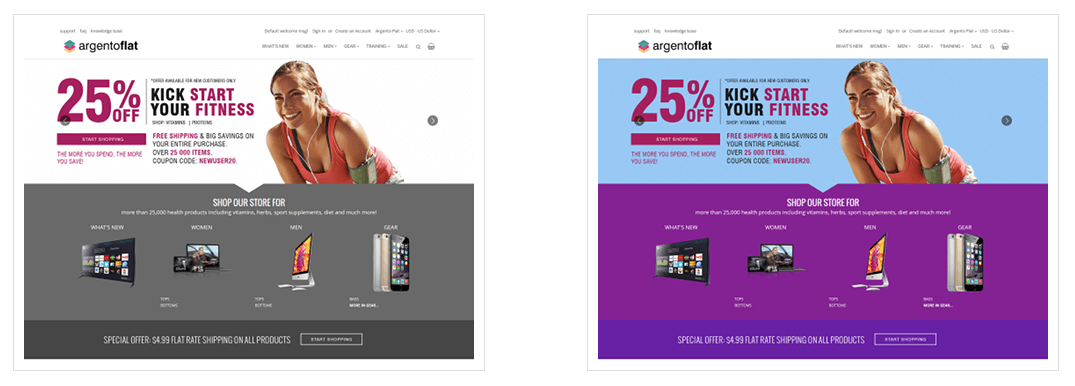
Let’s change default colors. Scroll down to see results.
@jumbotron__background: #fff;
@jumbotron-bright__background: #22a0f1;
@jumbotron-pastel__background: #842293;
@jumbotron-pastel-alt__background: #6820a5;
@jumbotron-dark__background: #222;
@jumbotron-pattern__background: url(../images/custom/seigaiha.png) 50% 0;
@jumbotron-image__background: url(../images/custom/noisy.png) 50% 0;
Note: If you want to replace pattern or image backgrounds, please place them into app/design/frontend/Swissup/argento-flat/web/images/custom folder.
cd magento/root/folder
rm -rf var/view_preprocessed
bin/magento setup:static-content:deploy
Please check the results.
This website uses cookies to improve your experience. By clicking “Deny”, you consent to the use of Necessary cookies only. You may also accept selected cookies only.